Lattice: A Query Engine in C++ - Part 1
-
A few weeks ago, while diving deep into database internals, I stumbled upon KQuery, an educational query engine written in Kotlin. Given my addiction to database internals and their nitty-gritty details, I thought a great exercise would be to implement my own query engine in C++, which would also help sharpen my C++ skills. That project is Lattice. In this series, I will walk you through the process, which is largely guided by KQuery, but with plenty of differences and adaptations required when building it in C++.
-
I also plan to experiment with consensus mechanisms for distributed databases, wire the engine up to an actual database storage layer, and test things out under load to see what interesting performance challenges emerge.
-
All of the code is available here: Lattice
What is a Query Engine?
-
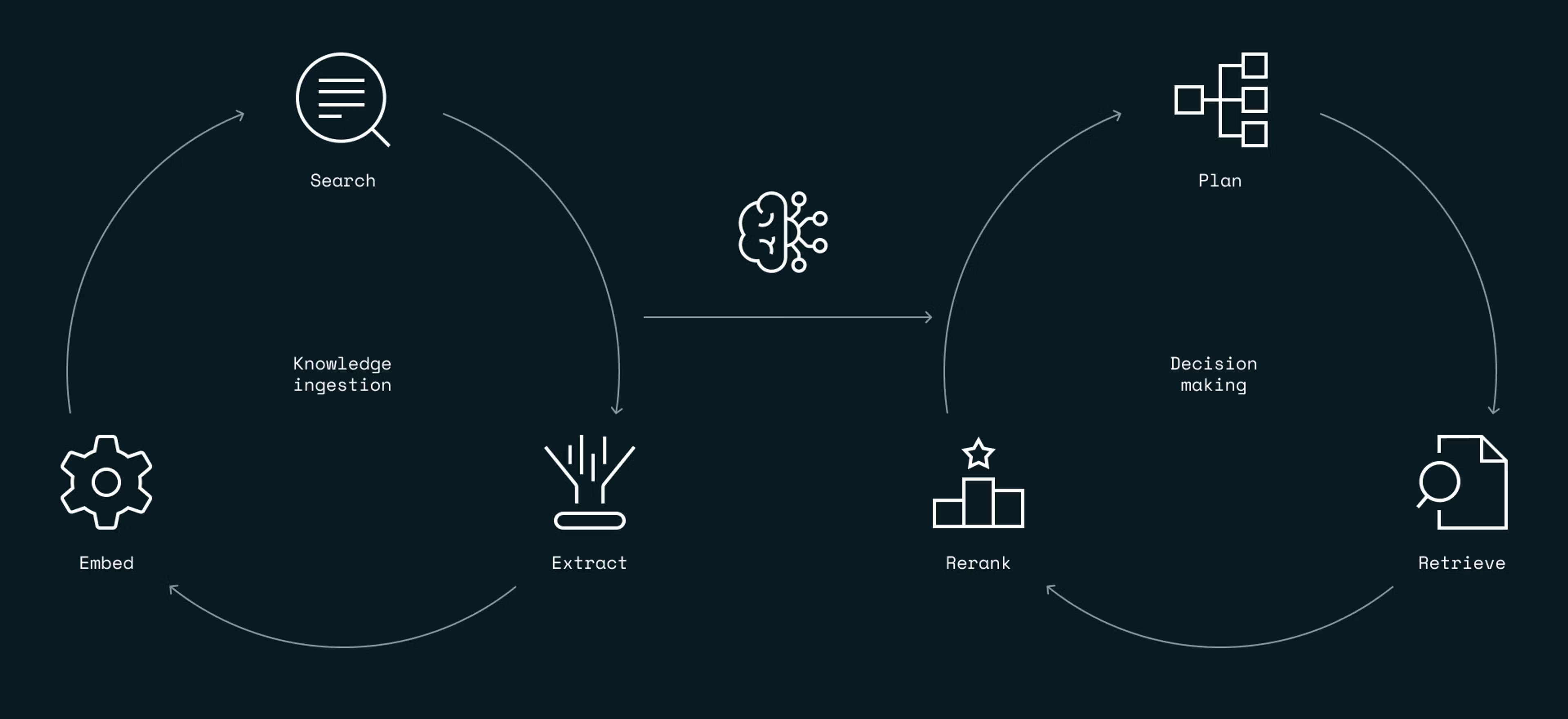
According to the KQuery Project documentation, a query engine is software that retrieves and processes data according to specific criteria. It is the component of a database that, given a query, optimizes, plans, and executes it against the storage layer. This sounds very similar to a compiler (another topic I love digging into!), and indeed, a query engine is essentially a specialized compiler that does the following:
- Parsing: Converts the raw query text into a structured representation (like an abstract syntax tree).
- Planning: Determines which relational operations are needed (scan, filter, project, aggregate, join).
- Optimization: Reorders and transforms operations into an efficient execution plan.
- Execution: Evaluates the plan against physical data and produces the final results.
-
Here is a great diagram from the Redis blog on the subject summarizing this lifecycle:
Data Types and the Query Engine Type System
-
Just like a compiler, a query engine must define types that accompany values so that the system can validate and reason about expressions. A type system is critical because it establishes structural rules to verify query validity, manage memory layout, and optimize execution before running queries.
-
We want a type system that is lightweight yet expressive enough to represent query variables, parameters, and outputs. This is why KQuery relies on Apache Arrow and its type system. The primary reasons for choosing Apache Arrow include:
- A rich set of standard types (integers, floats, strings, dates, etc.).
- An efficient in-memory columnar format for intermediate data representations.
- Broad compatibility with Arrow-based tools, file formats (like Parquet), and libraries.
-
Later on, we will see that Apache Arrow is valuable for much more than just its type system. For now, let’s start with our first C++ definitions, establishing the types used throughout Lattice:
namespace ArrowTypes {
    inline const std::shared_ptr<arrow::DataType> BooleanType = arrow::boolean();

    inline const std::shared_ptr<arrow::DataType> Int8Type = arrow::int8();
    inline const std::shared_ptr<arrow::DataType> Int16Type = arrow::int16();
    inline const std::shared_ptr<arrow::DataType> Int32Type = arrow::int32();
    inline const std::shared_ptr<arrow::DataType> Int64Type = arrow::int64();

    inline const std::shared_ptr<arrow::DataType> UInt8Type = arrow::uint8();
    inline const std::shared_ptr<arrow::DataType> UInt16Type = arrow::uint16();
    inline const std::shared_ptr<arrow::DataType> UInt32Type = arrow::uint32();
    inline const std::shared_ptr<arrow::DataType> UInt64Type = arrow::uint64();

    inline const std::shared_ptr<arrow::DataType> FloatType = arrow::float32();
    inline const std::shared_ptr<arrow::DataType> DoubleType = arrow::float64();

    inline const std::shared_ptr<arrow::DataType> StringType = arrow::utf8();
    inline const std::shared_ptr<arrow::DataType> BinaryType = arrow::binary();

    inline const std::shared_ptr<arrow::DataType> DateDayType = arrow::date32();
    inline const std::shared_ptr<arrow::DataType> IntervalDayTimeType = arrow::day_time_interval();
}
-
We use
std::shared_ptr<arrow::DataType>because that is how the Apache Arrow C++ library is designed to work. Coming from Kotlin, you might be used to everything being an object reference automatically. In C++, you have to explicitly manage how objects are stored and shared in memory. Arrow relies onstd::shared_ptrfor three major architectural reasons: -
Polymorphism: In Arrow,
arrow::DataTypeis an abstract base class. You cannot instantiate an abstract class directly in C++ (e.g.,arrow::DataType myType;will not compile). Concrete types likearrow::Int32Typeorarrow::StringTypeinherit fromDataType. To store a heterogeneous collection of types in a schema, you must use pointers.std::shared_ptr<arrow::DataType>allows a single container to hold integers, strings, and floats safely. -
Memory Efficiency: Basic types like a 32-bit integer do not carry unique state—an
int32is anint32everywhere. Instead of allocating memory every time an integer type is needed, Arrow maintains a single shared instance ofInt32Typeunder the hood. When we callarrow::int32(), Arrow returns astd::shared_ptrpointing to that shared global instance. This makes type comparisons extremely fast (pointer comparisons) and conserves RAM. -
Shared Ownership without Memory Leaks: Data types are heavily shared across a query engine:
- A
Fieldneeds to know its type. - A
Schemaholds multipleFields. - A
RecordBatchneeds to match theSchema. - An
ArrayBuilderneeds the type to allocate memory.
- A
-
If you passed raw pointers (
arrow::DataType*), you would have to track exactly when to delete the type without breaking other components still referencing it.std::shared_ptracts like reference-counted garbage collection—it tracks active references and frees the memory only when the reference count drops to zero.
Schemas and Fields
-
Next, let’s look at how we specify a schema for our data. Schemas provide essential metadata passed throughout the query engine. Along with column names and data types, a schema defines the complete structure of a dataset.
-
First, we define an individual
Field:
class Field {
public:
    std::string name;
    std::shared_ptr<arrow::DataType> dataType;

    Field(std::string n, std::shared_ptr<arrow::DataType> type)
        : name(std::move(n)), dataType(std::move(type)) {}

    std::shared_ptr<arrow::Field> toArrow() const {
        return arrow::field(name, dataType, true);
    }
};
-
A
Fieldconsists of two attributes:nameanddataType. In the constructor, we usestd::moveon both arguments to transfer ownership directly into the member variables and avoid unnecessary copies. ThetoArrow()member function callsarrow::field(name, dataType, true), which is an Arrow factory function that creates an ArrowFieldinstance. -
With our
Fieldclass in place, we can now build theSchemaclass:
class Schema {
public:
    std::vector<Field> fields;

    explicit Schema(std::vector<Field> f) : fields(std::move(f)) {}

    std::shared_ptr<arrow::Schema> toArrow() const {
        std::vector<std::shared_ptr<arrow::Field>> arrowFields;
        arrowFields.reserve(fields.size());

        for (const auto& f : fields) {
            arrowFields.push_back(f.toArrow());
        }

        return arrow::schema(arrowFields);
    }

    Schema project(const std::vector<int>& indices) const {
        std::vector<Field> projected_fields;
        projected_fields.reserve(indices.size());

        for (int idx : indices) {
            projected_fields.push_back(fields[idx]);
        }

        return Schema(projected_fields);
    }

    Schema select(const std::vector<std::string>& names) const {
        std::vector<Field> selected_fields;

        for (const auto& name : names) {
            std::vector<Field> matches;
            for (const auto& f : fields) {
                if (f.name == name) {
                    matches.push_back(f);
                }
            }

            if (matches.size() == 1) {
                selected_fields.push_back(matches[0]);
            } else {
                throw std::invalid_argument("Field not found or ambiguous: " + name);
            }
        }

        return Schema(selected_fields);
    }
};
-
This class definition provides three core member functions:
toArrow,project, andselect:-
toArrow(): Converts our custom fields into an Arrow schema. It iterates throughfields, converts each one usingf.toArrow(), stores them inarrowFields, and finally returnsarrow::schema(arrowFields). -
project(const std::vector<int>& indices): Takes a list of column indices, extracts the corresponding fields intoprojected_fields, and returns a new projectedSchema. -
select(const std::vector<std::string>& names): Looks up fields by name. It verifies that each name resolves to exactly one match before appending it toselected_fields, throwing an exception if the column is missing or ambiguous.
-
-
The final helper class in this section is
SchemaConverter, which constructs our nativeSchemafrom an Arrow schema:
class SchemaConverter {
public:
    static Schema fromArrow(const std::shared_ptr<arrow::Schema>& arrowSchema) {
        std::vector<Field> fields;

        // arrowSchema->fields() returns std::vector<std::shared_ptr<arrow::Field>>
        for (const auto& arrowField : arrowSchema->fields()) {
            fields.emplace_back(arrowField->name(), arrowField->type());
        }

        return Schema(fields);
    }
};
- To summarize why schemas are so essential:
- Validation: Reject queries that reference non-existent columns or apply invalid types.
- Planning: Determine output types and schemas for relational expressions.
- Optimization: Skip null checks for non-nullable columns and prune unused fields early.
- Execution: Allocate correctly typed storage buffers for intermediate and final results.
Column Vectors
- Apache Arrow inherently stores data in columns (also called arrays). Although columns have specific types (as defined earlier), we don’t want to write specialized logic everywhere a column is referenced. For example, while an
Int8Arrayrepresents a specific column vector in Arrow, writing custom handlers for every operator would be tedious. Instead, we define a common interface:ColumnVector.
#include <any>
#include <memory>
#include <arrow/api.h>
#include "ArrowTypes.hpp"

class ColumnVector {
public:
    virtual ~ColumnVector() = default;
    virtual std::shared_ptr<arrow::DataType> getType() const = 0;
    virtual std::any getValue(int i) const = 0;
    virtual int size() const = 0;
    virtual void close() = 0;
};
-
This interface declares four member functions:
getType(): Returns the ArrowDataTypeof the column.getValue(int i): Returns the value at row indexiwrapped in astd::any.size(): Returns the total number of elements in the vector.close(): Releases any held resources.
-
In the KQuery documentation, the author notes that using
Any?ingetValue(int i)incurs performance overhead due to boxing in Kotlin, but uses it for code simplicity. The same holds true in C++:std::anyintroduces type erasure and runtime checks, bypassing compile-time optimizations. However, becausestd::anyemploys Small Buffer Optimization (SBO) for primitive types, it avoids heap allocations on the CPU stack, making it acceptable for our early learning phase. -
Here is how we implement the
ColumnVectorinterface by wrapping an Arrow array:
class ArrowFieldVector : public ColumnVector {
private:
    std::shared_ptr<arrow::Array> field;

public:
    explicit ArrowFieldVector(std::shared_ptr<arrow::Array> array)
        : field(std::move(array)) {}

    std::shared_ptr<arrow::DataType> getType() const override {
        return field->type();
    }

    int size() const override {
        return field->length();
    }

    std::any getValue(int i) const override {
        if (field->IsNull(i)) {
            return {};
        }

        switch (field->type_id()) {
            case arrow::Type::BOOLEAN:
                return std::static_pointer_cast<arrow::BooleanArray>(field)->Value(i);
            case arrow::Type::INT8:
                return std::static_pointer_cast<arrow::Int8Array>(field)->Value(i);
            case arrow::Type::INT16:
                return std::static_pointer_cast<arrow::Int16Array>(field)->Value(i);
            case arrow::Type::INT32:
                return std::static_pointer_cast<arrow::Int32Array>(field)->Value(i);
            case arrow::Type::INT64:
                return std::static_pointer_cast<arrow::Int64Array>(field)->Value(i);
            case arrow::Type::FLOAT:
                return std::static_pointer_cast<arrow::FloatArray>(field)->Value(i);
            case arrow::Type::DOUBLE:
                return std::static_pointer_cast<arrow::DoubleArray>(field)->Value(i);
            case arrow::Type::STRING:
                return std::static_pointer_cast<arrow::StringArray>(field)->GetString(i);
            case arrow::Type::DATE32:
                return std::static_pointer_cast<arrow::Date32Array>(field)->Value(i);
            default:
                throw std::runtime_error("Unsupported vector type: " + field->type()->ToString());
        }
    }

    void close() override {
        field.reset();
    }
};
-
Let’s break this down:
ArrowFieldVectorinherits fromColumnVectorand stores a privatefieldmember of typestd::shared_ptr<arrow::Array>.getType()returnsfield->type(), which is Arrow’s built-in method returning thestd::shared_ptr<arrow::DataType>(e.g.,arrow::Int32Typeorarrow::StringType).size()returns the number of rows viafield->length().- The most interesting function is
getValue(int i). Because Arrow columns are stored as a genericstd::shared_ptr<arrow::Array>, the base class knows row count and nullability, but has no typedValue(i)accessor. We inspectfield->type_id()and usestd::static_pointer_castto cast the generic array to its concrete subclass (e.g.,arrow::Int32Array). Once cast,Value(i)directly reads the primitive element from Arrow’s contiguous memory buffer.
-
In short:
- “If this is a BOOLEAN column, cast to
BooleanArrayand grab theboolat rowi.” - “If this is an INT8 column, cast to
Int8Arrayand grab theint8_tat rowi.”
- “If this is a BOOLEAN column, cast to
-
While this might seem elementary to seasoned C++ developers, implementing it gave me a much deeper appreciation for how generic expression trees bridge to strictly typed physical buffers.
-
Finally,
close()resets thestd::shared_ptr, releasing the array. -
Another important nuance is creating Apache Arrow
ArrayBuilderinstances. In Arrow C++, arrays are strictly immutable. Whenever an engine produces new data (such as in projections or aggregations), it appends values row-by-row into anArrayBuilder, then finalizes it into an immutable array. -
To streamline builder creation, we introduce two helper classes:
class ArrowAllocator {
public:
    static arrow::MemoryPool* getRootPool() {
        return arrow::default_memory_pool();
    }
};

class FieldVectorFactory {
public:
    static std::unique_ptr<arrow::ArrayBuilder> create(
        const std::shared_ptr<arrow::DataType>& arrowType, int initialCapacity) {

        std::unique_ptr<arrow::ArrayBuilder> builder;
        arrow::Status status = arrow::MakeBuilder(
            ArrowAllocator::getRootPool(), arrowType, &builder);

        if (!status.ok()) {
            throw std::runtime_error("Unsupported type: " + arrowType->ToString());
        }

        if (initialCapacity > 0) {
            // Pre-allocate memory upfront
            (void)builder->Reserve(initialCapacity);
        }

        return builder;
    }
};
- In
ArrowAllocator, we obtain Arrow’s defaultarrow::MemoryPool. Arrow requires an explicit memory pool for allocations, and centralizing it here hides that low-level detail from our execution operators. - In
FieldVectorFactory,create()invokesarrow::MakeBuilder(...). Given anarrowType, capacity, and memory pool, it dynamically instantiates the correct builder subclass (e.g.,Int32Builder,StringBuilder) without requiring huge switch statements in every operator. - Additionally, calling
builder->Reserve(initialCapacity)wheninitialCapacity > 0avoids frequent dynamic array resizing. Since analytical query engines usually process data in fixed-size batches (e.g., 4,096 rows), allocating contiguous memory upfront eliminates costly reallocations in the execution loop.
Record Batches and Literal Values
-
In addition to column vectors backed by Arrow arrays, we also need virtual columns for literal constants.
-
When evaluating an expression like
salary * 1.1, the constant1.1must behave like a column of repeated1.1values matching the batch size. Rather than allocating memory for thousands of identical numbers, we create a virtual column usingLiteralValueVector:
class LiteralValueVector : public ColumnVector {
private:
    std::shared_ptr<arrow::DataType> arrowType;
    std::any value;
    int vector_size;

public:
    LiteralValueVector(std::shared_ptr<arrow::DataType> type, std::any val, int size)
        : arrowType(std::move(type)), value(std::move(val)), vector_size(size) {}

    std::shared_ptr<arrow::DataType> getType() const override {
        return arrowType;
    }

    std::any getValue(int i) const override {
        if (i < 0 || i >= vector_size) {
            throw std::out_of_range("Index out of bounds: " + std::to_string(i));
        }
        return value;
    }

    int size() const override {
        return vector_size;
    }

    void close() override {
        // No external resources to release for literal values
    }
};
-
This class returns the same literal value for any valid row index while consuming memory.
-
Now we arrive at
RecordBatch. A record batch bundles multiple column vectors alongside a schema. It represents the fundamental unit of data flowing through the query engine. Rather than processing a dataset one row at a time (which is slow due to virtual dispatch overhead) or materializing an entire table at once (which risks running out of memory), modern engines partition tables into manageable chunks of rows—typically 4,096 or 8,192 rows per batch. -
In traditional row-oriented architectures, 4,000 users might be represented as
std::vector<User>, where eachUserholds anid,name, andage. A record batch is columnar: it has no individual “row object”. Instead, it holds a schema and a collection of column vectors. -
For 4,000 users, a record batch contains:
columns[0]: AnInt32Arrayof 4,000 IDs contiguous in memory.columns[1]: AStringArrayof 4,000 names.columns[2]: AnInt32Arrayof 4,000 ages.
-
This columnar layout offers significant performance benefits:
- CPU Cache Efficiency: CPUs excel at reading contiguous blocks of identical data types, maximizing cache line utilization across L1/L2 caches.
- Vectorization (SIMD): When evaluating an expression like
age + 5, the engine doesn’t need to loop one element at a time; it can leverage SIMD instructions to process multiple values simultaneously over contiguous buffers. - Reduced Virtual Call Overhead: Rather than invoking an expression evaluator 4,000 times for 4,000 rows, the evaluator is called once per batch, processing all elements in a tight loop.
-
Furthermore, record batches in Arrow are immutable. This makes projections and slices virtually free: if a projection operator only needs the
agecolumn, it doesn’t copy the underlying integers; it simply creates a newRecordBatchpointing to the existing array with a subset schema. -
Here is our
RecordBatchimplementation:
class RecordBatch {
private:
    Schema schema;
    std::vector<std::shared_ptr<ColumnVector>> fields;

public:
    RecordBatch(Schema s, std::vector<std::shared_ptr<ColumnVector>> f)
        : schema(std::move(s)), fields(std::move(f)) {}

    int rowCount() const {
        if (fields.empty()) return 0;
        return fields.front()->size();
    }

    int columnCount() const {
        return fields.size();
    }

    std::shared_ptr<ColumnVector> field(int i) const {
        return fields[i];
    }

    std::string toCSV() const {
        std::stringstream b;
        int colCount = schema.fields.size();
        int rows = rowCount();

        for (int rowIndex = 0; rowIndex < rows; ++rowIndex) {
            for (int colIndex = 0; colIndex < colCount; ++colIndex) {
                if (colIndex > 0) {
                    b << ",";
                }

                auto v = fields[colIndex];
                std::any value = v->getValue(rowIndex);

                if (!value.has_value()) {
                    b << "null";
                }
                else if (value.type() == typeid(std::string)) {
                    b << std::any_cast<std::string>(value);
                }
                else if (value.type() == typeid(int32_t)) {
                    b << std::any_cast<int32_t>(value);
                }
                else if (value.type() == typeid(int64_t)) {
                    b << std::any_cast<int64_t>(value);
                }
                else if (value.type() == typeid(double)) {
                    b << std::any_cast<double>(value);
                }
                else if (value.type() == typeid(bool)) {
                    b << (std::any_cast<bool>(value) ? "true" : "false");
                }
                else {
                    b << "[Unsupported Type]";
                }
            }
            b << "\n";
        }
        return b.str();
    }

    std::string toString() const {
        return toCSV();
    }

    void close() {
        for (auto& f : fields) {
            f->close();
        }
    }
};
- A
RecordBatchpairs aSchemawith column vectors representing each field. It exposes helpers likerowCount(),columnCount(), and accessors for individual columns. We also implemented a simpletoCSV()serialization method to inspect batches during debugging, whileclose()delegates resource cleanup to each column.
The Life Cycle of a Query Engine
-
With the core data structures defined, let’s look at how data actually moves through the engine:
-
Scan / Ingestion: A data source (such as an in-memory batch or a Parquet file reader) reads raw data and yields
RecordBatchchunks via an iterator. -
Filter (Selection): A selection operator takes an incoming batch, evaluates a boolean expression (e.g.,
age > 18), generates a selection vector or bitmask, and produces a filteredRecordBatch. -
Projection: A projection operator evaluates scalar expressions or column references (e.g.,
col("salary") * 1.1) and usesArrayBuilderinstances to produce transformed output batches. -
Sink / Emission: The final batches are serialized, returned to the caller, or streamed across the network.
-
In subsequent parts of this series, we will implement these execution operators step-by-step.
Epilogue and References
-
I originally stumbled upon KQuery in a post on X (Twitter). Rewriting projects in other programming languages has always been one of my favorite ways to learn a new language. I did something similar when building a Concurrent Skiplist in OCaml as part of a broader exploration of the Mini-LSM project in Rust, and you can expect more posts on that front soon.
-
My previous experience with C++ primarily involved writing CUDA kernels for my ML inference engine project, Axiom, which I’ve also written about. Axiom is also my university capstone project for this year, so having a real deadline has certainly kept me motivated!
-
When writing this post, the KQuery Project documentation was my primary reference. The Redis blog on query engines provided the architectural overview diagram, and the Apache Arrow documentation was indispensable for understanding Arrow’s C++ internals. Other great primers include MotherDuck’s Query Engine Glossary and IBM’s Query Engine Overview.
-
In the next part, we’ll explore file formats and data sources supported by Lattice, followed by relational operators. That’s all for now!